Resume Format Guide 2026: Choose the Best Layout for Your Experience
Chronological, functional, or combination? Here’s exactly which resume format you should use (and why it matters).
So you’re ready to write your resume. You’ve got your experience lined up, you know what jobs you’re targeting, but then you hit a wall: what resume format should you even use?
Chronological? Functional? Combination? Hybrid? (Wait, aren’t combination and hybrid the same thing?) And why does everyone say different things about which are best?
Here’s the truth: the right resume format depends on your situation. There’s no one-size-fits-all answer, but there are clear guidelines on which resume format works best for different career situations.
This guide will break down all three main resume formats, show you examples of each, and help you figure out which is right for you.
Let’s get into it.
Why Your Resume Format Actually Matters
Before we dive into the different resume formats, let’s talk about why this decision matters at all.
The format you choose determines how hiring managers read your story. It controls what they see first, what stands out, and how easy it is to understand your background.
Your resume format impacts:
- ATS compatibility: Some resume formats get rejected by applicant tracking systems
- First impression: The wrong resume format can make you look disorganized or hiding something
- Readability: Hiring managers spend 6-7 seconds scanning—format affects whether they find what they need
- Story clarity: The right resume format highlights your strengths; the wrong one exposes weaknesses
So yeah, it matters. Now let’s figure out which resume format is right for you.
The 3 Main Resume Formats (And When to Use Each)
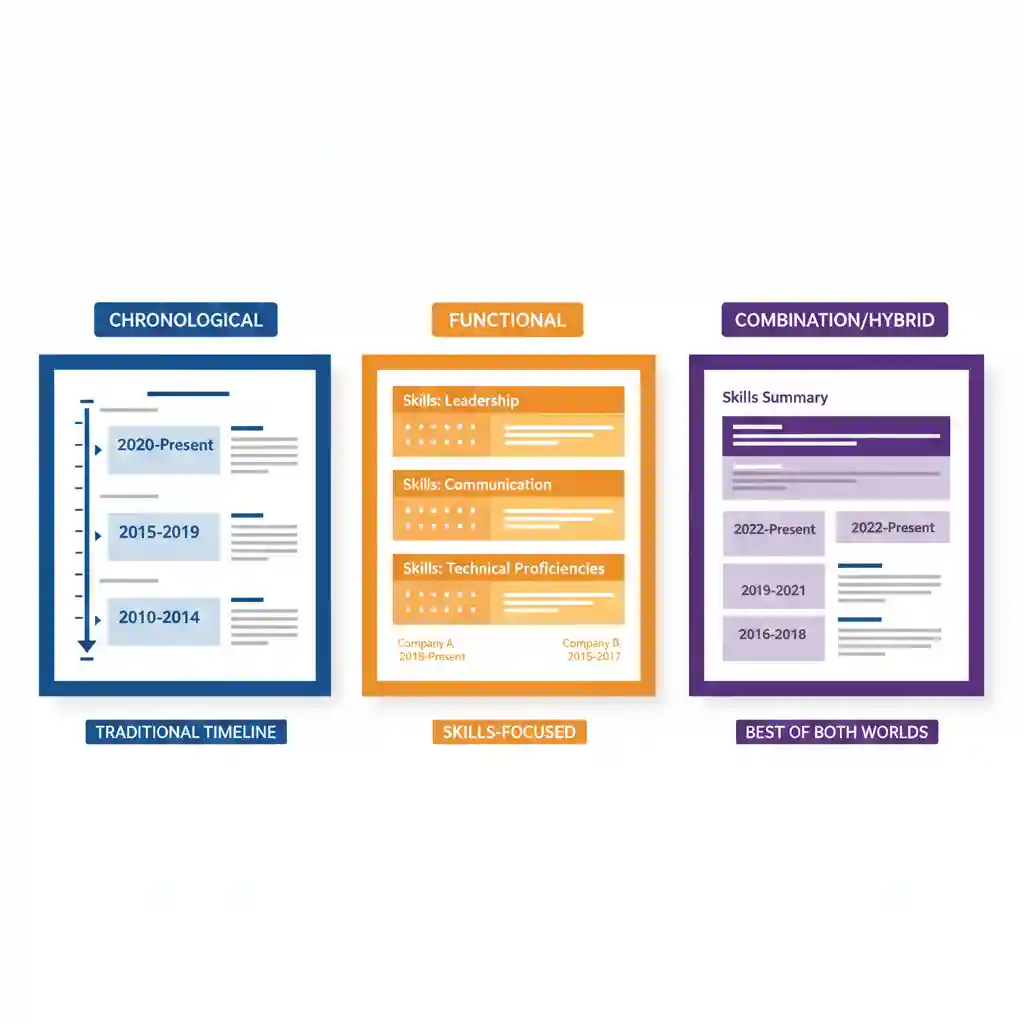
There are three main resume formats you’ll encounter: chronological, functional, and combination (also called hybrid). Let’s break down each one.
1. Chronological Resume Format
This is the most common format, and for good reason—it’s what hiring managers expect to see. A chronological format lists your work experience in reverse chronological order, starting with your most recent job.
What a Chronological Resume Format Looks Like
Structure:
- Contact information
- Professional summary or objective
- Work experience (most recent first)
- Education
- Skills
Example layout:
SARAH JOHNSON Marketing Manager | Chicago, IL | sarah.johnson@email.com PROFESSIONAL SUMMARY Results-driven marketing manager with 7+ years driving brand growth… WORK EXPERIENCE Marketing Manager | TechStart Inc. | June 2021 – Present • Led digital marketing campaigns generating $2M in revenue • Managed team of 5 marketing specialists • Increased social media engagement by 250% Marketing Coordinator | GrowthCo | Jan 2019 – May 2021 • Developed content strategy for 3 product launches • Grew email subscriber list from 5K to 45K EDUCATION BA Marketing | University of Illinois | 2018
When to Use the Chronological Resume Format
Use this resume if:
- You have a consistent work history in the same field
- You’re advancing in your current career path
- You want to show clear career progression
- Your most recent jobs are your most impressive
- You have no major employment gaps
Don’t use this format if:
- You’re changing careers
- You have significant employment gaps
- You’re entry-level with limited experience
- Your work history is all over the place
Pros of Chronological Resume Format
- Most ATS-friendly: Applicant tracking systems love this resume
- Familiar to hiring managers: This is what they expect to see
- Shows career growth: Easy to see how you’ve advanced
- Easy to scan: Hiring managers can quickly assess your timeline
Cons of Chronological Resume Format
- Highlights gaps: Any breaks in employment are immediately obvious
- Shows job hopping: Frequent job changes stand out negatively
- Bad for career changers: Emphasizes experience in the wrong field
Bottom line: This chronological resume works for about 90% of job seekers. If your career path is relatively straightforward, use this one.
2. Functional Resume Format (Skills-Based)
A functional resume format (sometimes called a skills-based resume format) focuses on your skills and abilities rather than your work history. Instead of listing jobs chronologically, you organize the resume by skill categories.
What a Functional Resume Format Looks Like
Structure:
- Contact information
- Professional summary
- Skills categories (with accomplishments under each)
- Brief work history (just company, title, dates—no details)
- Education
Example layout:
MICHAEL CHEN Project Management Professional | michael.chen@email.com SUMMARY Cross-functional leader with expertise in agile methodologies… PROJECT MANAGEMENT • Led 15+ projects with budgets ranging from $100K to $2M • Improved project delivery time by 30% through process optimization • Managed teams of 5-20 members across multiple departments STAKEHOLDER COMMUNICATION • Facilitated weekly executive presentations to C-suite • Translated technical concepts for non-technical audiences • Negotiated project scope with clients maintaining 95% satisfaction TECHNICAL SKILLS • Proficient in JIRA, Asana, MS Project, Salesforce • Agile & Scrum certified • Data analysis and reporting WORK HISTORY Senior Project Coordinator | ABC Corp | 2020-2024 Project Assistant | XYZ Inc | 2018-2020 EDUCATION BS Business Administration | State University | 2018
When to Use the Functional Resume Format
Use this format if:
- You’re making a major career change
- You have significant employment gaps
- You’ve job-hopped frequently
- Your skills are more impressive than your job titles
Don’t use this format if:
- You have a strong, consistent work history
- You’re applying to companies with strict ATS systems
- The job posting asks for chronological format
Pros of Functional Resume Format
- Hides gaps and job hopping: Downplays problematic work history
- Highlights transferable skills: Great for career changers
- Showcases accomplishments: Puts your wins front and center
Cons of Functional Resume Format
- ATS unfriendly: Many applicant tracking systems struggle with this resume format
- Raises red flags: Hiring managers know you’re hiding something
- Hard to verify claims: Difficult to connect achievements to specific jobs
- Not preferred: Many companies explicitly don’t want this resume format
Bottom line: Use the functional resume format sparingly. It can work for major career changes, but be aware that many hiring managers are skeptical of it. Consider using the combination format instead.
3. Combination Resume Format (Hybrid)
The combination resume format (also called hybrid resume format) merges the best parts of chronological and functional formats. It starts with a skills summary, then follows with chronological work history.
What a Combination Resume Format Looks Like
Structure:
- Contact information
- Professional summary
- Skills summary or core competencies
- Work experience (reverse chronological, with details)
- Education
Example layout:
JESSICA MARTINEZ Software Engineer | jessica.martinez@email.com | Portfolio: jmartinez.dev PROFESSIONAL SUMMARY Full-stack developer specializing in React and Node.js with 5 years building scalable web applications… CORE COMPETENCIES Frontend: React, Vue.js, TypeScript, HTML5/CSS3 Backend: Node.js, Python, RESTful APIs, GraphQL Tools: Git, Docker, AWS, CI/CD pipelines Methodologies: Agile, Test-Driven Development PROFESSIONAL EXPERIENCE Senior Software Engineer | CloudTech Solutions | 2022 – Present • Architected microservices platform serving 1M+ daily users • Reduced page load time by 40% through performance optimization • Mentored 3 junior developers Software Engineer | StartupCo | 2020 – 2022 • Built customer-facing dashboard using React and Node.js • Implemented automated testing increasing code coverage to 85% • Collaborated with product team on feature prioritization EDUCATION BS Computer Science | Tech University | 2020
When to Use the Combination Resume Format
Use this format if:
- You have strong skills AND solid work history
- You’re making a slight career pivot (not total change)
- You’re in a technical field where skills matter most
- You want to highlight both what you can do and where you’ve done it
- You’re applying for senior or specialized roles
Don’t use this format if:
- You’re entry-level with limited experience
- Your work history is very straightforward
- You need to keep your resume to one page
Pros of Combination Resume Format
- Best of both worlds: Highlights skills while showing work history
- Flexible: Adapts well to different situations
- Skills-forward: Puts your abilities up front
- More ATS-friendly than functional: Still includes clear work history
Cons of Combination Resume Format
- Takes up more space: Often requires two pages
- Can be repetitive: Skills section might overlap with job descriptions
- More complex: Requires more effort to create and update
The combination format is a solid middle ground. Use it when you want to emphasize skills but still need to show a clear work history.
Check out this Harward University’s Guide on resume formats.
Resume Format Comparison: Quick Reference
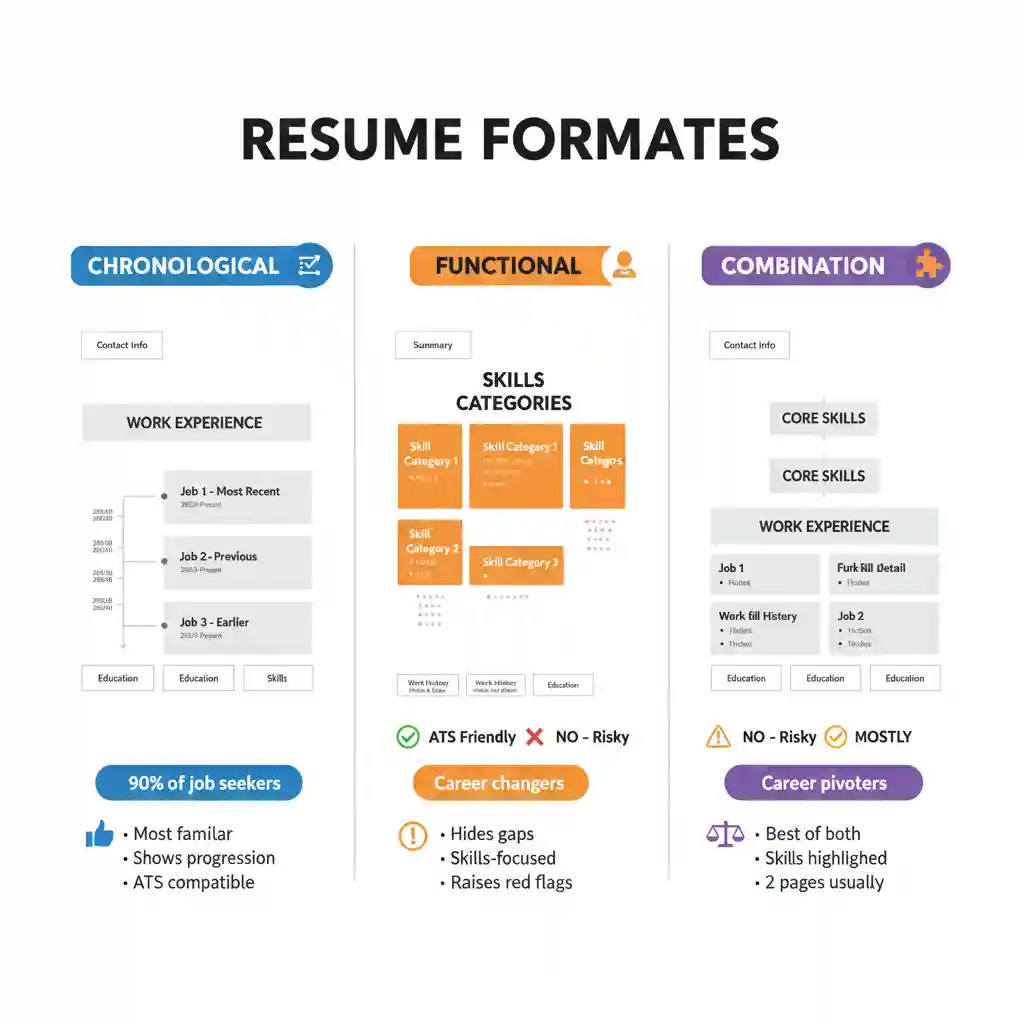
Chronological Format:
- Best for: Consistent work history, career progression
- ATS friendly: Yes (most compatible)
- Length: 1-2 pages
- Difficulty: Easy
Functional Format:
- Best for: Career changers, gaps, job hoppers
- ATS friendly: No (often problematic)
- Length: 1-2 pages
- Difficulty: Moderate
Combination Format:
- Best for: Career pivoters, experienced professionals, technical fields
- ATS friendly: Mostly (if structured well)
- Length: Usually 2 pages
- Difficulty: Harder (more content to organize)
How to Choose the Right Resume Format for You
Still not sure which resume format to use? Answer these questions:
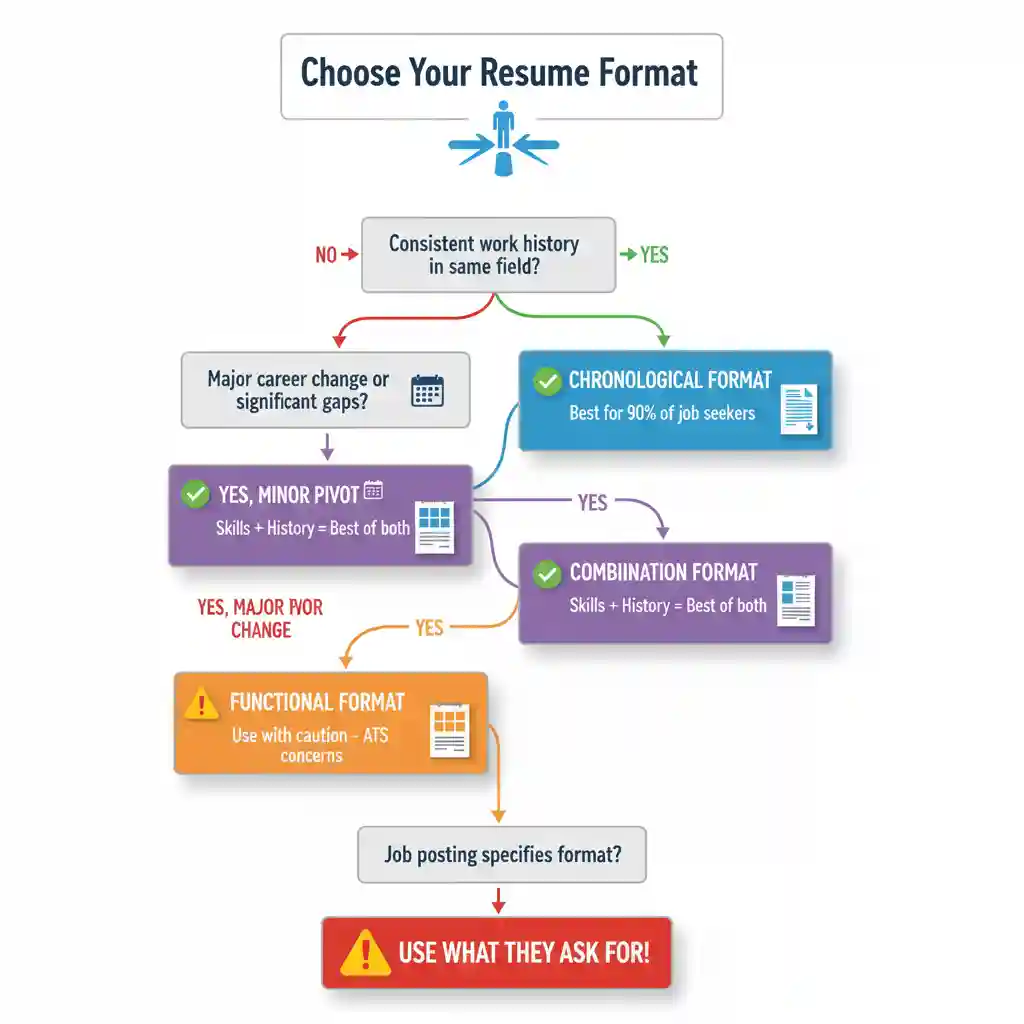
Question 1: Do you have a consistent work history in the same field?
- If YES → Use chronological format
Question 2: Are you changing careers or have significant gaps?
- If YES, minor pivot → Consider combination format
- If YES, major change → Functional format (but be cautious)
Question 3: Are you in a technical or specialized field?
- If YES → Combination format often works best
Question 4: Does the job posting specify a format?
- If YES → Use what they ask for, period
Resume Format Best Practices (For All Formats)
No matter which format you choose, follow these universal rules:
1. Keep It Clean and Readable
- Use standard fonts (Arial, Calibri, Georgia, Times New Roman)
- Font size: 10-12pt for body, 14-16pt for name
- Plenty of white space
- Consistent formatting throughout
2. Make It ATS-Friendly
- Use standard section headings (Work Experience, Education, Skills)
- Avoid tables, text boxes, headers/footers
- Save as .docx or PDF (check job posting)
- Include keywords from job description
3. Prioritize Relevant Information
- Most important stuff at the top
- Tailor content to each job application
- Cut irrelevant experience
4. Use Consistent Formatting
- Same date format throughout (e.g., “Jan 2020” or “01/2020”)
- Consistent bullet style
- Uniform spacing between sections
5. Proofread Like Your Job Depends on It
Because it does. One typo can get your resume tossed. Read it backwards, use spell-check, and have someone else review it.
Common Resume Format Mistakes to Avoid
Mistake 1: Using the Wrong Format for Your Situation
Using a functional format when you have a solid work history just looks suspicious. Use the format that highlights your strengths, not one that hides your weaknesses.
Mistake 2: Getting Too Creative
Unless you’re a designer, stick to traditional formats. Creative resumes with graphics and unusual layouts often get rejected by ATS systems.
Mistake 3: Making It Too Long
Your format shouldn’t require three pages to tell your story. One page for entry-level, two pages max for experienced professionals. If it’s longer, you’re including too much.
Mistake 4: Inconsistent Formatting
If you bold one job title, bold them all. If you spell out “September,” don’t use “Nov” elsewhere. Consistency shows attention to detail.
Mistake 5: Ignoring ATS Requirements
Your beautifully formatted resume means nothing if it can’t get through the ATS. Test your resume format in an ATS checker before submitting.
Want more help with your resume? Check out our complete guide on how to write a resume for step-by-step instructions on every section.
The Bottom Line on Resume Format
Choosing the right resume format isn’t complicated:
- Chronological format: Use this 90% of the time. It’s what hiring managers expect and what ATS systems handle best.
- Combination format: Use when you need to emphasize skills while showing work history. Good for career pivoters and senior roles.
- Functional format: Use sparingly and only when absolutely necessary. Be aware that many hiring managers are skeptical of this resume.
When in doubt? Go chronological. It’s the safest choice for the vast majority of situations.
Now pick your format and start writing. The format is just the container—what matters most is the content you put inside it.
Ready to Write Your Resume?
Check out our complete resume writing guide, plus tips on cover letters and LinkedIn optimization.
Discover more from eduhire.blog
Subscribe to get the latest posts sent to your email.